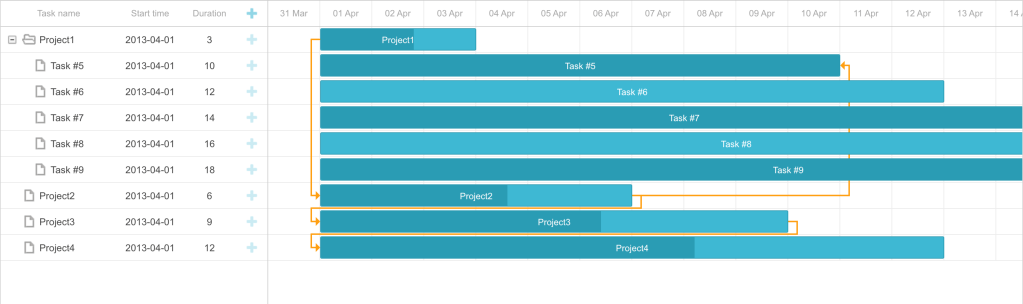
This page shows an example on how to embed dhtmlx-gantt chart on Visualforce page. Using the same approach, we can embed on AURA and LWC components as well.
Download open source JavaScript Gantt chart javascript libraries from the below link:
https://github.com/DHTMLX/gantt/tree/master/codebase
More examples on Gantt chart can be found in the below link:
https://www.npmjs.com/package/dhtmlx-gantt
Static Resource:
Upload the git repository cloned from above link into your Salesforce org.
Visualforce Page:
<apex:page standardController="Opportunity" standardStylesheets="false" showHeader="false">
    <head>
        <apex:stylesheet value="{!URLFOR($Resource.Timeline, 'gantt/codebase/dhtmlxgantt.css')}"/>
        <apex:includeScript value="{!URLFOR($Resource.Timeline, 'gantt/codebase/dhtmlxgantt.js')}"/>
        <style type="text/css" media="screen">
            html, body { margin:0px; padding:0px; height:100%; overflow:hidden; }
        </style>
    </head>

    <body>
        <div id="gantt_here" style='width:100%; height:100%;'></div>
        <script type="text/javascript">

            let ganttDataArr = [];

        	for(let newParntObj=1; newParntObj < 5; newParntObj++ ) {
                let ganttDataObj = {};
                ganttDataObj["id"] = newParntObj;
                ganttDataObj["text"] = "Project"+newParntObj;
                ganttDataObj["start_date"] = "01-04-2013";
                ganttDataObj["duration"] = newParntObj*3;
                ganttDataObj["order"] = "10";
                ganttDataObj["progress"] = "0.6";
                ganttDataObj["open"] = true;
                ganttDataArr.push(ganttDataObj);
            }

            for(let newObj = ganttDataArr.length+1; newObj < 10; ++newObj ) {
                let ganttDataObj = {};
                ganttDataObj["id"] = newObj;
                ganttDataObj["text"] = "Task #"+newObj;
                ganttDataObj["start_date"] = "01-04-2013";
                ganttDataObj["duration"] = newObj*2;
                ganttDataObj["order"] = '10';
                ganttDataObj["progress"] = newObj%2;
                ganttDataObj["parent"] = '1';
                ganttDataArr.push(ganttDataObj);
            }

            let tasks =  {
                data: ganttDataArr,
                links:[
                    { id:1, source:1, target:2, type:"1"},
                    { id:2, source:2, target:3, type:"0"},
                    { id:3, source:3, target:4, type:"0"},
                    { id:4, source:2, target:5, type:"2"},
                ]
            };

            gantt.init("gantt_here");
            gantt.parse(tasks);

		</script>
    </body>
</apex:page>
In the above code, we do imple dynamic creation of Project and task under the project (not too fancy, but dynamic).
 Salesforce Dreamer